
Architecture
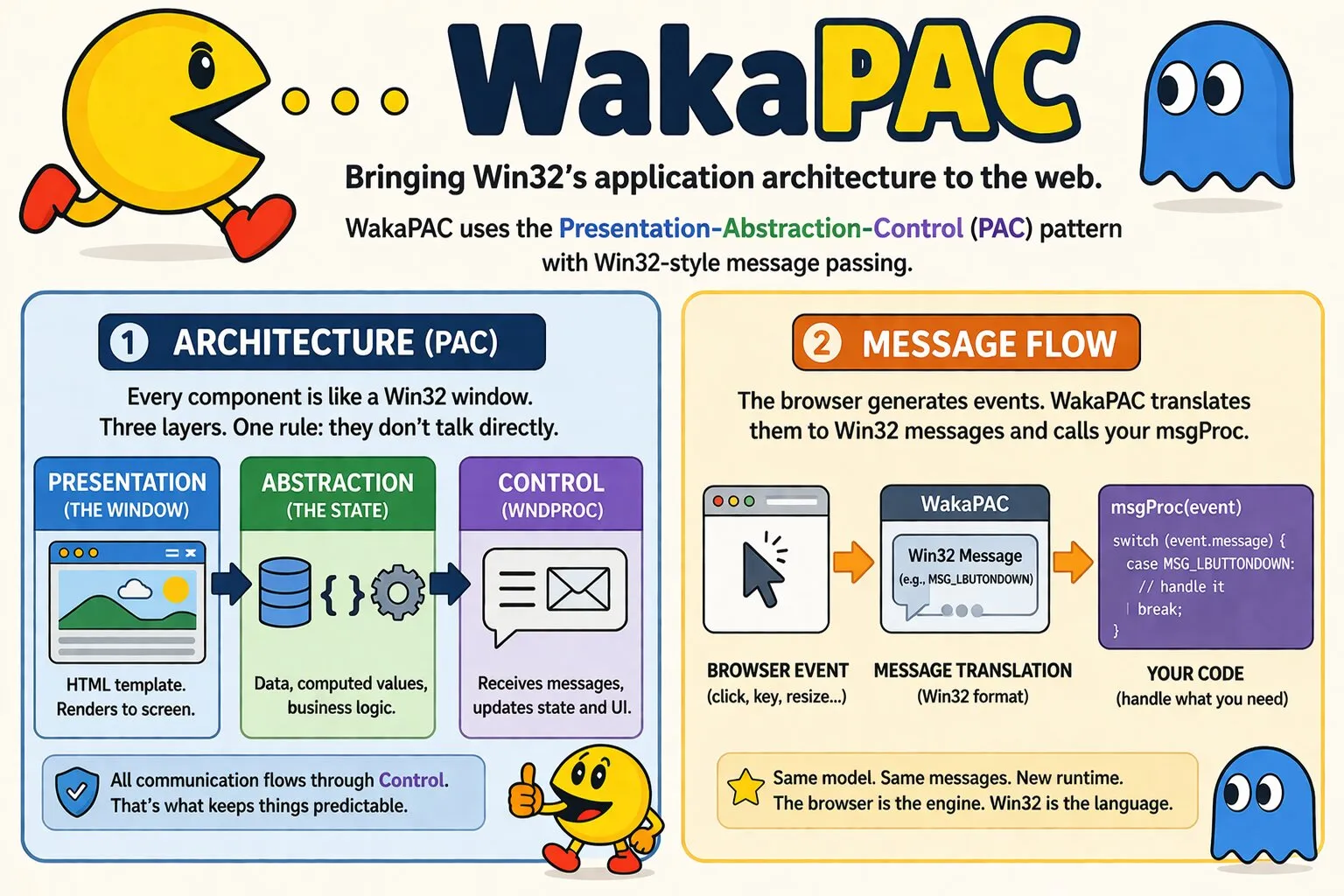
WakaPAC brings Win32's application architecture to the browser. Win32's window model is a natural implementation of the Presentation-Abstraction-Control pattern, and WakaPAC adopts it wholesale — the same structure, the same message-passing model, the same mental model.
On this page:
Win32 and PAC
The Presentation-Abstraction-Control (PAC) pattern separates an application into three layers: Presentation (what the user sees), Abstraction (application state and logic), and Control (the layer that keeps them in sync). In Win32, every window works this way:
- The window is the Presentation — it owns its visual area and renders content to screen.
- The application state is the Abstraction — data, computed values, business logic.
- The WndProc receives all messages for the window and decides how each event affects state and UI.
The critical property of this model is that Presentation and Abstraction never communicate directly. Everything flows through the Control layer. State changes update the window; user input arrives as messages to WndProc. The application is predictable because there is only one path for anything to happen.
WakaPAC maps this model directly to the browser. A WakaPAC component is the browser equivalent of a Win32 window.
Its HTML template is the Presentation. Its data and methods are the Abstraction. WakaPAC itself is the Control layer
— and msgProc is the equivalent of WndProc, the function you implement to handle messages
within it.
PAC versus MVC
Both Presentation-Abstraction-Control (PAC) and Model-View-Controller (MVC) separate presentation from application logic, but they do so in fundamentally different ways. MVC divides an application into global Models, Views, and Controllers. PAC applies the same separation recursively, treating every feature as an independent Presentation-Abstraction-Control agent. Large applications are built by composing these agents into a hierarchy rather than by expanding a shared set of controllers.
This architecture provides several practical advantages as applications grow. Because Presentation and Abstraction communicate only through their local Control layer, each agent is completely self-contained. State remains local to the feature that owns it, reducing coupling between unrelated parts of the application and making agents easy to reuse in other projects.
PAC also scales more naturally than MVC. New functionality is added by introducing child agents instead of increasing the responsibilities of existing controllers. Changes are usually confined to a single branch of the hierarchy, so modifying one feature has little impact on the rest of the application. The explicit parent-child message flow also makes it easier to trace how information propagates through the system when debugging.
Finally, PAC provides a single coordination point for each feature. User input, application events, parent-child communication, and asynchronous operations all pass through the Control layer. Because every interaction follows the same message-based path, logging, auditing, middleware, and other cross-cutting behaviour can be introduced without tightly coupling components together.
These characteristics make PAC particularly well suited to modern component-based user interfaces, where applications are naturally organised as trees of nested components. WakaPAC adopts this architecture directly, allowing each component to remain an independent agent while communicating with the rest of the application through explicit messages.
Components as Windows
State declared in a component is wrapped in a reactive proxy. HTML bindings that reference state properties register as dependents when first evaluated. When a property changes, only the bindings that depend on it are re-evaluated, and the DOM is updated only if the value actually changed. This is the Control layer at work — mediating between Abstraction and Presentation without either layer knowing about the other.
Computed properties follow the same model. They are derived values defined as functions, tracked automatically for dependencies, and invalidated when those dependencies change. From the template's perspective they are indistinguishable from plain data.
msgProc and the Message Pipeline
In Win32, WndProc is a single function that receives every message for a window — mouse events,
keyboard events, paint requests, timer ticks — identified by a numeric constant. You handle what you need and ignore
the rest. WakaPAC's msgProc is exactly this.
wakaPAC('#app', {
    msgProc(event) {
        switch (event.message) {
            case wakaPAC.MSG_LBUTTONDOWN:
                const x = wakaPAC.LOWORD(event.lParam);
                const y = wakaPAC.HIWORD(event.lParam);
                this.handleClick(x, y);
                break;

            case wakaPAC.MSG_KEYDOWN:
                if (event.wParam === wakaPAC.VK_ESCAPE) {
                    this.close();
                }

                break;
        }
    }
});
Internally, WakaPAC registers DOM event listeners and browser observers on your behalf. When an event fires, the
toolkit translates it into Win32 message format — packing mouse coordinates into lParam, modifier flags
into wParam — and dispatches to msgProc. The message constants, parameter conventions, and
virtual key codes are identical to their Win32 counterparts. The browser is the runtime; Win32 is the vocabulary.
msgProc is optional. Components that only need reactive data binding do not need to implement it.
sendMessage and postMessage
Win32 windows communicate by sending messages to each other using SendMessage() and
PostMessage(). WakaPAC components do the same. sendMessage() delivers a message
synchronously and waits for the receiving component's msgProc to return.
postMessage() queues the message and returns immediately.
// Sender
wakaPAC('#toolbar', {
    notifyContent() {
        wakaPAC.sendMessage('content', wakaPAC.MSG_USER + 1, 0, 0, { action: 'refresh' });
    }
});

// Receiver
wakaPAC('#content', {
    msgProc(event) {
        switch (event.message) {
            case wakaPAC.MSG_USER + 1:
                this.refresh(event.detail.action);
                break;
        }
    }
});MSG_USER (0x1000), exactly as Win32 applications
use WM_USER.
Win32 Concepts Applied to the DOM
The following maps each Win32 concept to the browser primitive WakaPAC uses underneath.
Message Loop → Event Listeners
Each WakaPAC message is backed by a DOM event listener on document or window, or by a
browser observer such as ResizeObserver or MutationObserver. The toolkit translates the
DOM event into Win32 message format before dispatching to msgProc.
Virtual Key (VK) Codes → KeyboardEvent.code
WakaPAC maps KeyboardEvent.code — the physical key identifier, e.g. 'KeyA' — to
VK_* constants via a lookup table. The deprecated KeyboardEvent.keyCode (and
.which) is used only as a fallback when no .code mapping exists.
SetCapture / ReleaseCapture → Mouse Capture Redirection
wakaPAC.setCapture() redirects all subsequent mouse events to a single target container regardless of
hit-testing — the same single-capture-owner model Win32 uses, where setting capture on a new element automatically
releases it from whichever element held it before. wakaPAC.releaseCapture() restores normal event
routing and dispatches MSG_CAPTURECHANGED to the container that lost capture.
WM_SIZE → ResizeObserver
Each component's container is observed via ResizeObserver. A size change dispatches
MSG_SIZE with the new dimensions packed into lParam and a wParam of
SIZE_HIDDEN, SIZE_FULLSCREEN, or SIZE_RESTORED — mirroring Win32's
SIZE_MINIMIZED / SIZE_MAXIMIZED / SIZE_RESTORED.
WM_SETFOCUS / WM_KILLFOCUS → focusin / focusout
Focus entering or leaving a component's container dispatches MSG_SETFOCUS / MSG_KILLFOCUS,
exactly as Win32 notifies a window when it gains or loses keyboard focus.
WM_MOUSEWHEEL → wheel
Wheel events dispatch MSG_MOUSEWHEEL with the scroll delta packed into wParam, the same
parameter Win32 uses to carry wheel rotation.
WM_COPY / WM_PASTE → copy / paste
Clipboard copy and paste events dispatch MSG_COPY / MSG_PASTE to the component under the
cursor or focus.
WM_CONTEXTMENU → contextmenu
Right-click (or equivalent) dispatches MSG_CONTEXTMENU before the browser's native context menu
appears. Handling it and calling event.preventDefault() suppresses the native menu, the same pattern
Win32 applications use to replace it with a custom one.
Drag-and-Drop → HTML5 Drag Events
The closest Win32 analog is WM_DROPFILES / OLE drag-and-drop. WakaPAC dispatches
MSG_DRAGENTER, MSG_DROPTARGET_ENTER, MSG_DROPTARGET_LEAVE,
MSG_DRAGLEAVE, and MSG_DROP from the corresponding native
dragenter/dragover/dragleave/drop
events, with the dropped payload available on the message detail.
SetTimer / MSG_TIMER → shared requestAnimationFrame loop
setTimer() registers with a single, shared requestAnimationFrame-driven loop used by every
component's timers — not setInterval. This is a deliberate choice: some browsers throttle
setInterval/setTimeout in background tabs, which caused irregular
MSG_TIMER delivery. The loop checks each registered timer's elapsed time every frame and dispatches
MSG_TIMER when its interval has passed; killTimer() deregisters it, and the loop stops
itself once no timers remain.
MSG_PAINT Scheduling → requestAnimationFrame
When a WakaPAC component is bound to a <canvas> element, calling
invalidateRect() schedules a requestAnimationFrame callback — mirroring how Win32
coalesces WM_PAINT messages. Multiple invalidations before the frame fires are merged into a dirty
region; a set of rectangles MSG_PAINT clips against.
Device Context (DC) → CanvasRenderingContext2D
When a WakaPAC component is bound to a <canvas> element, getDC() returns its
CanvasRenderingContext2D wrapped with clip state management. The abstraction is in how the handle is
acquired and released, not in the drawing calls themselves.
Compatible DC → Offscreen CanvasRenderingContext2D
When a WakaPAC component is bound to a <canvas> element,
createCompatibleDC() creates a CanvasRenderingContext2D backed by a hidden
<canvas> sized to match the target container. bitBlt() copies between them using
drawImage() internally.
Bitmap Handle → Opaque Offscreen Canvas Wrapper
Bitmap handles returned by loadBitmap() wrap an offscreen canvas with the decoded image. Pass them to
bitBlt(), getBitmapSize(), saveBitmap(), or
deleteBitmap() exactly as you would an HBITMAP.
Display Scaling → devicePixelRatio
WakaPAC handles high-DPI internally. Canvas backing stores are sized in physical pixels, and
getCanvasSize() always returns physical pixel dimensions. You always work in physical pixel coordinates
when drawing.
WM_DPICHANGED → devicePixelRatio Change Notification
Separately from the static sizing above, WakaPAC watches for devicePixelRatio changing at runtime — for
example when a window is dragged to a monitor with a different DPI — via matchMedia, and dispatches
MSG_DPR_CHANGE when it does, the same event Win32's WM_DPICHANGED exists to deliver.