
WakaMask
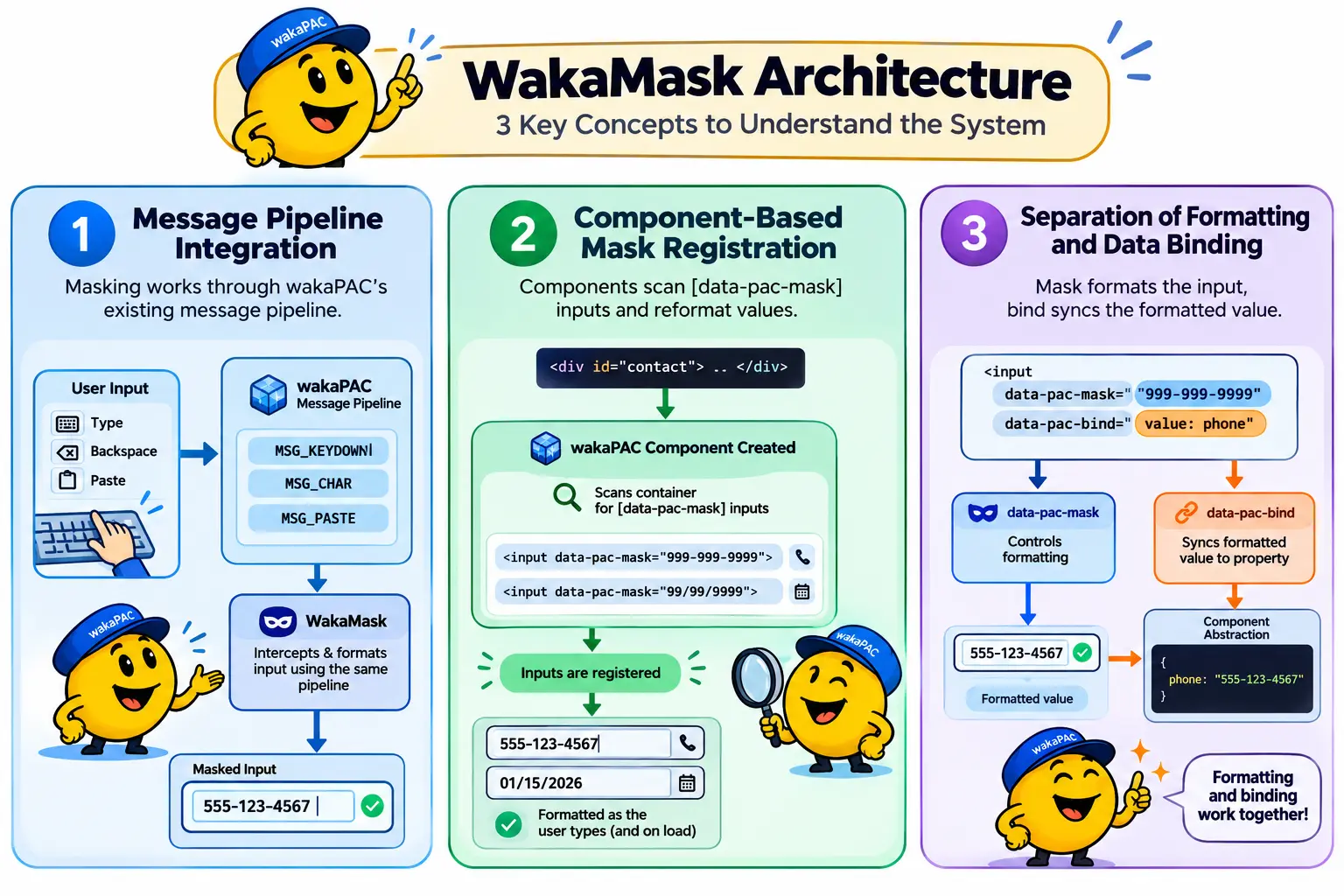
WakaMask is a live input masking plugin for wakaPAC. It formats phone numbers, dates, codes, and any other literal/placeholder pattern as the user types. There are no parallel DOM listeners — keystrokes, deletions, and paste are intercepted through wakaPAC's existing message pipeline (MSG_KEYDOWN, MSG_CHAR, MSG_PASTE), the same pipeline every other event in your component already flows through.
On this page:
Getting Started
Include the script after wakaPAC, register the plugin, then add data-pac-mask to any text input:
<script src="https://cdn.jsdelivr.net/gh/quellabs/wakapac@main/wakapac.min.js"></script>
<script src="https://cdn.jsdelivr.net/gh/quellabs/wakapac@main/plugins/wakamask.min.js"></script>

<script>
    wakaPAC.use(WakaMask); // must be called before any wakaPAC() calls
</script>
data-pac-mask and data-pac-bind are independent — the mask controls formatting, the bind controls which abstraction property the (already formatted) value syncs to:
<div id="contact">
    <input type="text" data-pac-mask="999-999-9999" data-pac-bind="value: phone" placeholder="555-123-4567">
    <span data-pac-bind="visible: phoneStatus">{{ phoneStatus }}</span>
</div>
wakaPAC('#contact', {
phone: '',
phoneStatus: '',
msgProc(event) {
switch (event.message) {
case WakaMask.MSG_MASK_REJECT:
this.phoneStatus = `"${String.fromCharCode(event.wParam)}" isn't a digit`;
break;
case WakaMask.MSG_MASK_COMPLETE:
this.phoneStatus = 'Looks good';
break;
}
}
});WakaMask scans a component's container for [data-pac-mask] inputs when the component is created and reformats the field as the user types. No other configuration is required — this.phone always holds the formatted display value, since that's what two-way binding reads off the input.
Usage
Pattern Tokens
A mask pattern is a sequence of tokens. Any character not listed below is a literal — inserted automatically and never directly typed over:
| Token | Matches |
|---|---|
9 |
A single digit, [0-9]. |
a |
A single letter, [A-Za-z]. |
* |
A single alphanumeric character, [A-Za-z0-9]. |
\x |
Escapes x so a token character (9, a, *, or \) is treated as a literal instead of a slot. |
Examples: 999-999-9999 (US phone), 99/99/9999 (date), aaa-999 (license-plate style), ***-*** (alphanumeric code).
Registering a Masked Field
Add data-pac-mask directly to an <input type="text">. Any pre-existing value (e.g. server-rendered) is reformatted the moment the component is created:
<input type="text" data-pac-mask="99/99/9999" value="01152026">
<!-- reformatted on load to 01/15/2026 -->
input[type="number"] is not supported — the field's type must be text (or another type that supports setSelectionRange(), such as tel). Use inputmode="numeric" for a numeric keyboard on mobile instead of type="number".
Multiple Masked Fields
A component can have any number of masked inputs — each one is registered independently when the component is created, no extra configuration needed:
<div id="profile">
    <input type="text" data-pac-mask="999-999-9999" data-pac-bind="value: phone">
    <input type="text" data-pac-mask="99/99/9999"   data-pac-bind="value: birthDate">
</div>
Reacting to Mask State
Two messages arrive in msgProc as a field is typed into. Because they're delivered via sendMessage() rather than a real DOM event, event.target resolves to the component's container, not the input — use event.detail.target (shown below as extended.target) to identify which field fired:
| Message | wParam | Description |
|---|---|---|
WakaMask.MSG_MASK_COMPLETE |
Raw value length | Fires once every fillable slot is filled. extended.target is the <input>, extended.value is the formatted value. |
WakaMask.MSG_MASK_REJECT |
Rejected character code | Fires when a typed character doesn't match the slot it would land on (e.g. a letter typed into a digit slot). extended.target is the <input>. Does not fire when the mask is simply full — that's expected behavior, not a rejection, the same as hitting maxlength on a plain input. |
Distinguishing fields when a component has more than one masked input:
msgProc(event) {
    switch (event.message) {
        case WakaMask.MSG_MASK_COMPLETE:
            if (event.detail.target === phoneInput) {
                this.phoneStatus = 'Looks good';
            } else if (event.detail.target === birthDateInput) {
                this.birthDateStatus = 'Looks good';
            }
            break;
    }
}
Programmatic Value Access
Use WakaMask.setValue() rather than assigning the bound property directly — a raw assignment bypasses masking entirely and leaves the field showing an unformatted value until the next keystroke:
async init() {
    const contact = await fetch('/api/contact/42').then(r => r.json());
    WakaMask.setValue(phoneInput, contact.phone); // formats + fires a real 'input' event
}
this.phone in the abstraction always holds the formatted display value. To get the raw significant characters (e.g. for an API payload), use WakaMask.getRawValue() rather than parsing the formatted string yourself:
submit() {
    const digits = WakaMask.getRawValue(phoneInput); // "5551234567"
    this._http.post('/api/contact', { phone: digits });
}
API
wakaPAC.use(WakaMask)
Registers the WakaMask plugin with the wakaPAC runtime.
| Parameter | Type | Description |
|---|---|---|
WakaMask | object | The WakaMask plugin object. Must be called before any wakaPAC() calls so masked inputs are scanned and registered when their component is created. |
Returns void | ||
WakaMask.setValue(input, value)
Programmatically sets a masked input's value. Accepts raw digits/letters or an already-formatted string — non-mask characters are stripped and the result is reformatted against the input's pattern. Fires a real input event so any two-way binding on the field stays in sync.
| Parameter | Type | Description |
|---|---|---|
input | HTMLInputElement | A registered masked input (has data-pac-mask and was present when its component was created). |
value | string | Raw or formatted value. Characters that don't match the mask's tokens are dropped; literals already present are discarded and rebuilt rather than matched positionally. |
Returns void | ||
WakaMask.getRawValue(input)
Returns the significant characters of a masked input's current value, with literals stripped out.
| Parameter | Type | Description |
|---|---|---|
input | HTMLInputElement | A registered masked input. |
Returns string | The raw significant characters, e.g. "5551234567" for a field displaying 555-123-4567. | |
Notes
input[type="number"] is not supported. The spec forbids calling setSelectionRange() on it, which WakaMask needs for caret placement while typing. Use type="text" with inputmode="numeric" for numeric masks instead.
Inputs added to the DOM after their container's component is created — for example, rows appended inside a foreach after the initial render — are not automatically picked up. Registration happens once, when the component is created, by scanning the container for [data-pac-mask] elements.
IME composition is not intercepted (event.key === 'Process' during composition). Composed text lands in the field unmasked; the field reformats correctly on the next plain keystroke, paste, or WakaMask.setValue() call, but not while actively composing.
MSG_MASK_COMPLETE and MSG_MASK_REJECT are derived from wakaPAC.MSG_PLUGIN + 0x200 and + 0x201. WakaYouTube and WakaVideo use the 0x100–0x10C range. If you have other plugins installed, confirm their message offsets don't collide with WakaMask's.
Two value-rewriting plugins should not be installed on the same input. WakaMask intercepts MSG_KEYDOWN/MSG_CHAR/MSG_PASTE globally via a message hook and rewrites input.value directly; a second plugin doing the same on the same field has no way to know WakaMask already handled the keystroke, and the two will corrupt each other's output.
Best Practices
- Register before creating components — call
wakaPAC.use(WakaMask)before anywakaPAC()calls so masked inputs are found and registered during component creation. - Pair with
data-pac-bindfor two-way binding —data-pac-maskonly controls formatting. Without adata-pac-bind="value: ..."alongside it, the field will format correctly but nothing in the abstraction will reflect its value. - Read
event.detail.target, notevent.target—MSG_MASK_COMPLETE/MSG_MASK_REJECTare delivered viasendMessage(), soevent.targetresolves to the container, not the input. This only matters once a component has more than one masked field, but it's easy to get burned by later. - Use
WakaMask.setValue()for programmatic updates — assigning the bound property directly bypasses masking and leaves the field showing an unformatted value until the next keystroke. - Use
WakaMask.getRawValue()for payloads — don't parse the formatted display value yourself; the plugin already knows which characters are literals. - Don't rely on
MSG_MASK_REJECTfor "field is full" — that case is silent by design, the same as hittingmaxlengthon a plain input. The message only fires for a genuine type mismatch mid-mask.